I’m sharing a list of cat kaomoji that I’ve created, which you can copy and paste directly into your bios or messages. If you’re not familiar with kaomoji, they are text-based emoticons that originated in Japan. They use punctuation marks and symbols to represent faces, and then have become popular in online communities.
The beauty of kaomoji is that they are very easy to use because you can just copy and paste them anywhere. Unlike emojis, which often require a specific app or device to be recognized correctly, kaomoji are usually readable across devices, though very old devices or apps may not display every Unicode glyph.
So if you want to add some cute accents to your bios, captions, or messages, here are my favorite cat kaomoji that you can copy and paste right now:
Core Classic Cat
(=^・ω・^=)
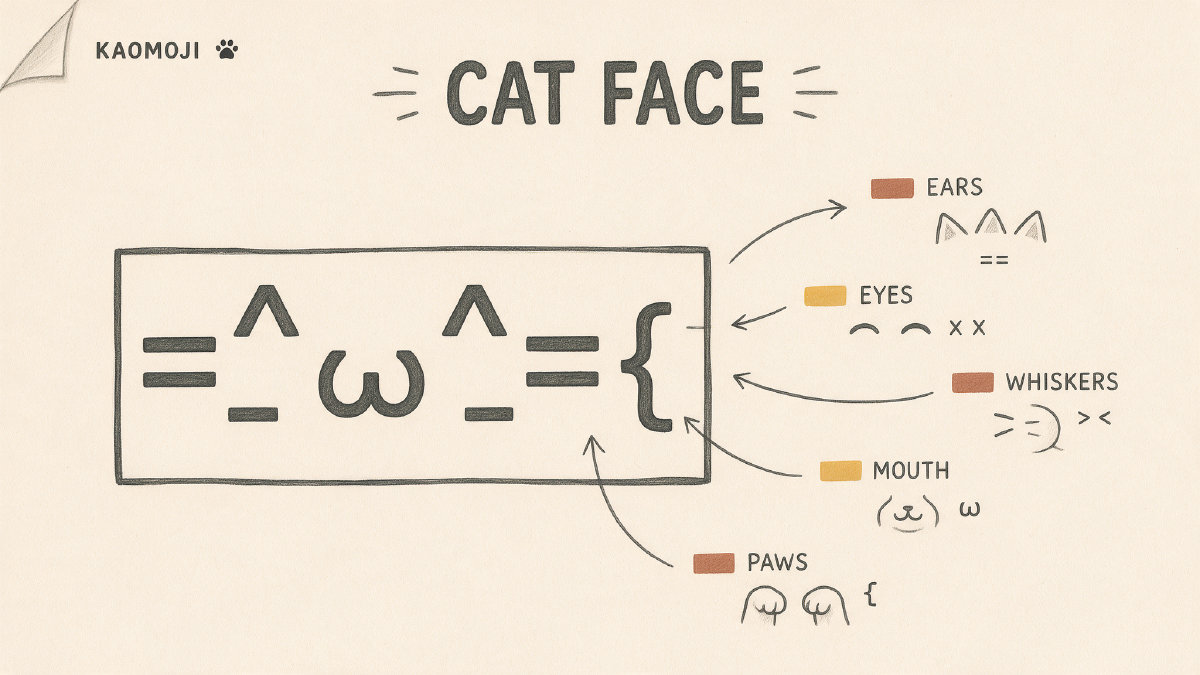
This is the core classic cat, but it’s broken down so you can see what makes up each part of its face. The ears are represented by the caret symbol (^), the whiskers are represented by the equals sign (=), and the mouth is represented by the Greek omega symbol (ω). In other cat kaomoji, the paw is represented by the Thai letter (ฅ), and the tail is represented by the tilde (~).
Neutral & Happy Cats
(=^・ω・^=) (=^-ω-^=) (=^ω^=) (=^◡^=)
Here are some of my favorites from the neutral and happy set. These are the ones I’d recommend using first since they’re the most commonly used and recognizable.
Paws-Up & Waving Cats
ฅ^•ﻌ•^ฅ ฅ(=・ω・=)ฅ ヽ(=^・ω・^=)丿 ٩(=^・ω・^=)۶
These cats are more playful, so they’re great for greetings, excitement, and reactions on Discord.
Softer Shy, Sad, & Tearful Cats
(=;ェ;=) (=T ω T=) (=╥﹏╥=) (´;ω;`∪)
These cats are softer, so they’re good for gentle or apologetic messages.
Grumpy & Angry Cats
(=`ω´=) (`皿´) (=xェx=) (`益´)
These cats are mood-forward, so they’re good for when you just need to show your attitude. I wouldn’t suggest these for everyday use, but they’re definitely fun to use sometimes.
Sleepy & Zzz Cats
( ´-ω-` )zzZ (=^-ω-^=)zzZ ( ฅωฅ ) ~zZ ( ᵕᴗᵕ ) Zzz
These cats are perfect for night-time bios, statuses, and low-energy captions.
Shortest Cat Kaomoji
(=ω=) (=^・^=) (=^-ω-^=) (=^・ω・^=)
If you’re looking for the shortest cat kaomoji, these are the ones you’ll want to use. They’re perfect for tight bios and username fields.
Placement Tips
When using cat kaomoji, keep in mind that they’re meant to be accents rather than the main focus. So if you’re using one on your profile, stick to just one accent. If you’re using them in a caption, don’t go overboard — maybe a couple spaced out in the middle. And if you’re using them in a message, don’t use too many. Just one at the end to mark the tone of the message.
Also, when copying and pasting, make sure you copy exactly what I have written above. Some apps or devices may change the glyphs if you retype them instead of copy and pasting. You’ll also want to make sure that whatever field you’re pasting into supports Unicode text. Some older apps or devices might not support all Unicode characters.
Compatibility Check
To double-check, you can always do a quick test before committing. Paste the kaomoji into the actual bio, username, caption, or chat field you want to use it in. If it stays intact there, try checking it on another device too — very old devices or apps may show rarer glyphs as empty boxes. If that happens, pick a simpler cat kaomoji.