The name you choose to share publicly can be a little bit more than just letters. There’s an opportunity to add some flair, or to use symbols that may stand out to others who are scrolling through your profile.
There are many ways to incorporate this into your username, display name, nickname, and/or biography. You’ll find cute symbols in the Unicode block of plain accents, but also emojis and stylized mathematical-alphabet letters. Each have their place. However, it’s possible that these decorations can sometimes make things difficult for screen readers and search functions on various platforms, especially when they come in pairs (such as brackets) that enclose text.
Unicode is a universal standard, but support for it isn’t universal. That means what works for one service won’t always work another. But you should be able to experiment with your options and find something that works best for you.
In addition to decorative accents, there are also several “frame” characters which wrap a name. They’re all Unicode characters, so they generally don’t require installing a font, though support can vary by device and platform.
This article does not attempt to become a font generator by describing each character. Rather, I simply present them here so that you can choose what might work best for you.
Cute Name Symbols
Unicode Accent Characters
Plain Unicode accent characters are essentially invisible unless used to create a visible symbol. These are generally small enough to include within a name or a bio. The following are examples of plain Unicode accents:
Heart: ♡
Bow: ✿
Star: ★
Flower: 🌸
Sparks: 🔥
Arrow: →
Dividers: —
Borders: ─
Soft Brackets: ()
These characters are Unicode characters, though support can vary by device and platform.
Unicode Emoji
Unicode emoji provide much of the same utility as the basic accent symbols. These, too, are Unicode characters, though individual emoji were introduced in different Unicode versions and support can vary by device and platform.
Stylized Mathematical-Alphabet Letters
Some people prefer stylized versions of Latin alphabet letters, often incorporating mathematical-style embellishments. While these do exist, there’s no guarantee that they’ll be accepted by any particular application, game, or social media service. In addition, while stylized letters might look nice, they carry some trade-offs. For example, search algorithms will try to match the actual letter against queries, so a stylized “A” won’t help if someone types in “a.” Search results might also be confusing if you have multiple instances of a stylized “a” appearing as a symbol elsewhere. This isn’t necessarily a problem, though; it depends on how exactly a given algorithm parses stylized characters.
While stylized letters may seem like the obvious choice, remember that screen readers often parse stylized characters differently than plain ones. Some even ignore them. So you’ll need to keep that in mind as well.
Simple Fill-In Patterns
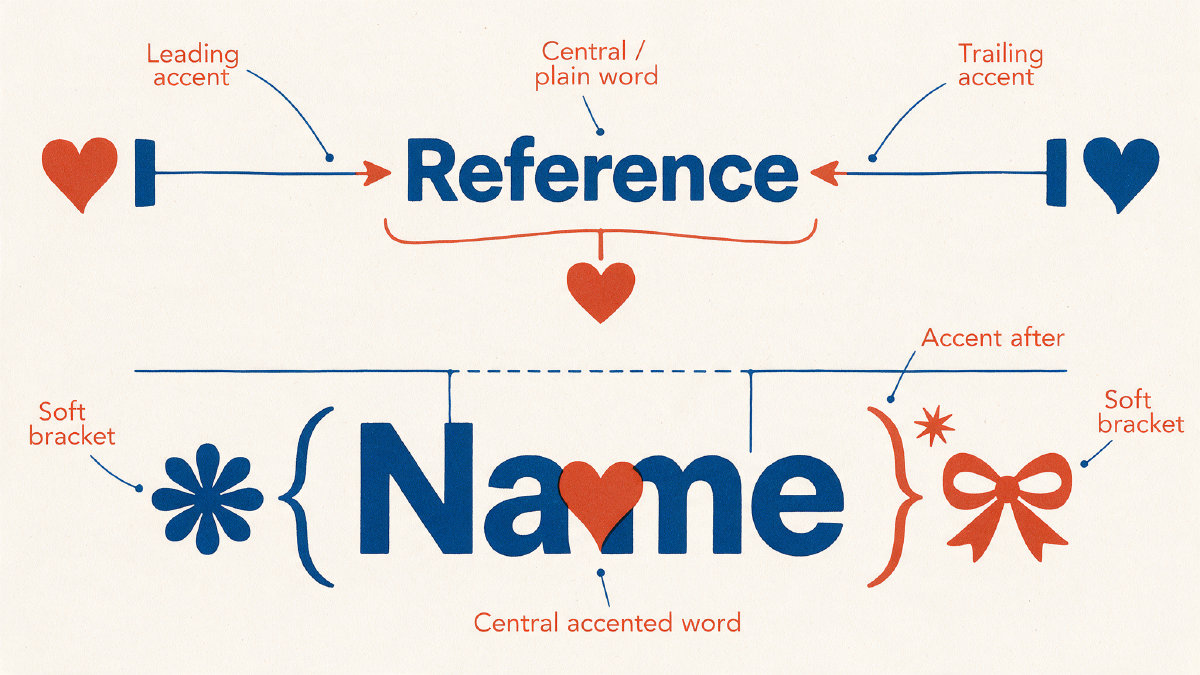
Here are a few simple examples where the name remains central, using one heart, star, or flower as a prefix or suffix:
- ♡ Luna ✿
- ★ Milo ♡
- Mimi ♡
- Theo ✿
- Zoe ★
Adding More Accents
There are also cases where you’ll want to arrange short accents before, after, or lightly around a name so that it remains readable. Restrained prefixes and suffixes don’t need to feel crowded; a handful of additional accents can mark different motifs:
- Prefix or suffix: one small accent placed before or after the name
- Borders: compact horizontal lines on either side
- Hearts, stars, sparkles, or bows: soft decorative motifs
- Dividers or arrows: simple ways to separate or point toward the name
All of these are also Unicode characters, though support can vary by device and platform. They can all be copied and pasted as-is.
Standalone Decorations
I’ve also gathered standalone decorations that can be used independently, and then combined with a name either inside or beside them. Because they’re all separate, they preserve the exact characters that were used to create them. I believe that shorter combinations are easier to use than longer ones, especially for those who might need to enter them frequently. I also recommend trying shorter combinations first.
If you’d like to use one of these as a standalone decoration, just copy-and-paste it wherever you’d like to use it!
For example:
- ꒰ ♡ ♡ ꒱
- ˗ˏˋ ♡ ₊˚ ˎˊ˗
- ୨ ♡ ☆ ୧
- ꒰ ♡ ─ ꒱
- ₊˚ ♡ → ˚₊
Frame Pairs
There are several frame pairs available that can wrap a name, including the light everyday brackets:
- ( )
- [ ]
- { }
- < >
Also available are some heavier frames that could be considered ornate borders, such as:
- 「 」
- ༺ ༻
- ꧁ ꧂
Of course, the wider styles are more suited to roomy display-name fields.
@ Handles vs Display Names
One of the most popular uses for @ handles is in Instagram, which allows users to choose both a unique username and a nickname. According to the documentation for the site, a username must consist of up to 30 characters made up of letters, periods, numbers, or underscores. If the platform changes its rules, there’s a chance that this might affect your ability to decorate your username accordingly.
Unique Handle Example
At this point, I’m going to distinguish between a username, display name, nickname, and biography — terms that are commonly confused. I’m doing this because I know that certain services will only allow certain characters within a username, and other services may allow them within a display name, nickname, or bio. On Instagram, the distinction looks like this:
- Username/handle: @username, using only letters, numbers, periods, or underscores
- Display name or nickname: the name shown on your profile, usually with more styling freedom
- Bio: the short biography text beneath your profile details
So the decorated characters usually belong in the display name, nickname, or bio rather than the unique @ handle.
Where to Place Cute Name Symbols?
As long as the platform accepts them, you can add cute name symbols to a display name, nickname, or bio, but character limits and readability still matter. I think that you’ll find that adding cute symbols will help to set your online presence apart from others.
I’m not making blanket compatibility claims for named apps or games, however. My advice would be to test your symbols out in different areas, just to see if they work. Otherwise, it’s likely that they will be accepted somewhere else.
Testing Your Cute Name Symbols
It’s entirely possible that one of the characters I’ve mentioned will not work at all. It could be that it appears as a square glyph, that it gets cut off, or that it just doesn’t render correctly at all.
The solution to the problem is usually to swap to a common compact symbol, such as the asterisk (*), or move the decoration to another area.
Field-by-Field Troubleshooting
If a display name rejects a character, swap to a common compact symbol or save the fancier decoration for your bio. If a character appears as a square glyph there, use a simpler symbol that renders on more devices. In the bio, test the replacement first; if it still fails, keep the text plain and use a common symbol such as *, ♡, or ★.
Field-by-Field Testing
Finally, it’s worth noting that many sites will accept a name that has been wrapped by cute symbols. However, a very light frame, such as ♡ [name] ♡, is more likely to keep your name recognizable to both readers and search functions. Just be sure to avoid combining your name with too many cute symbols.